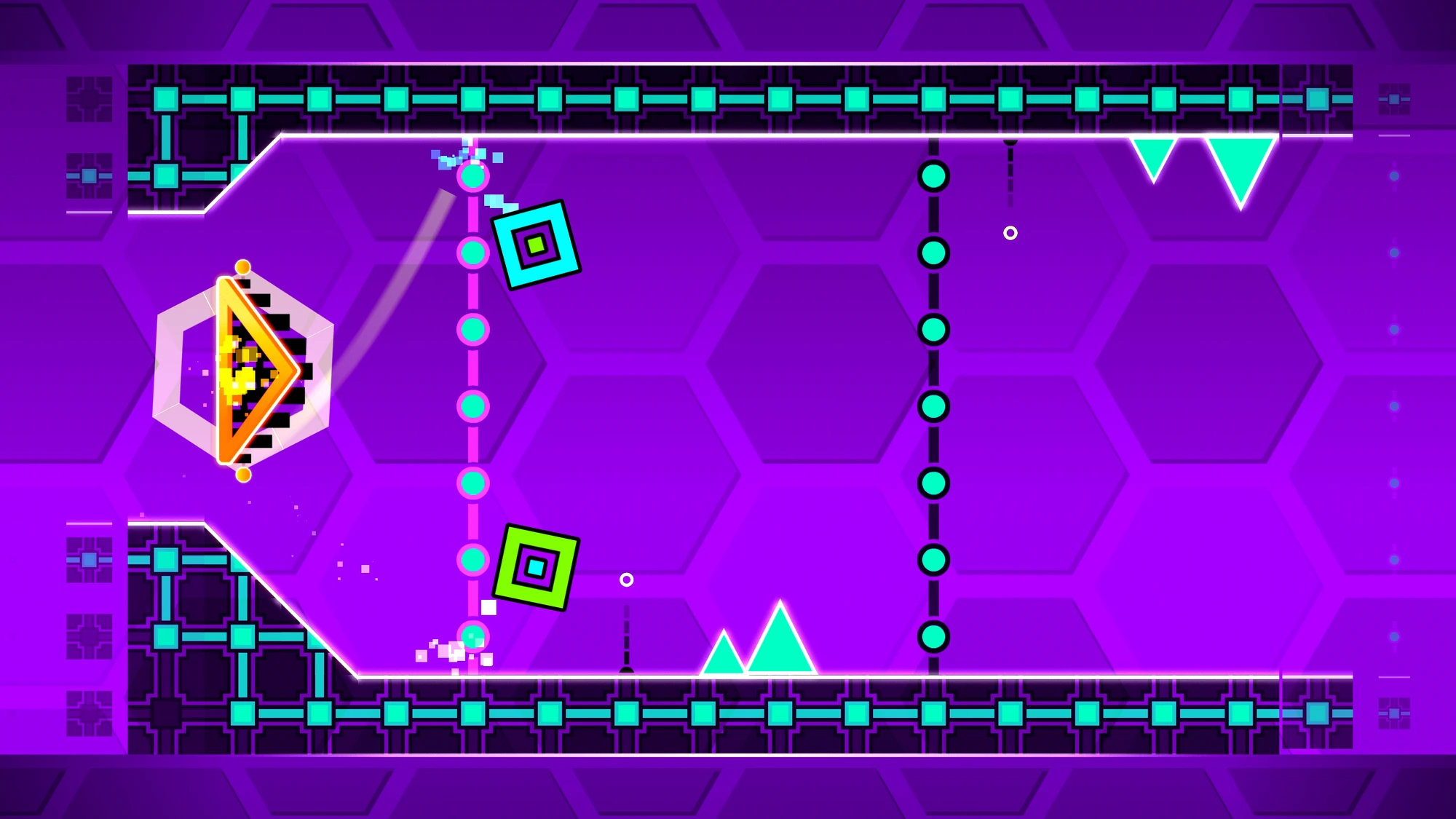
It happened again. You're cruising through the level, the music is pumping, and then the screen splits. Suddenly, you aren't just controlling one icon; you're managing two. One is on the ceiling, one is on the floor, and your brain basically short-circuits. Welcome to Hexagon Force Geometry Dash, the level that introduced the dual portal and changed the game's difficulty curve forever.
Released back in 2014 as part of the 1.8 update, this level serves as the 16th official stage in RobTop’s rhythm-platformer. It’s rated Insane, and honestly, it earns that title. While levels like Theory of Everything 2 or Clubstep are harder because of tight flying or memory, Hexagon Force is hard because it asks you to multitask in a way no previous level did. It’s a psychological barrier. Once you "get" the rhythm of the dual sections, it feels like a dance. Until then? It feels like trying to pat your head and rub your stomach while jumping over spikes.
The 1.8 Update and the Birth of the Dual Portal
Before Hexagon Force, Geometry Dash was a relatively straightforward affair. You jumped, you flew, maybe you flipped gravity. But 1.8 changed the DNA of the game. RobTop introduced the dual portal—a bright orange gate that splits your icon into two. If one dies, you both die.
This wasn't just a new mechanic; it was a total shift in how players had to perceive the screen. In Hexagon Force Geometry Dash, the dual sections aren't just for show. They require specific, asymmetrical inputs. Most people struggle at the 40% mark. That’s where the first real dual mini-ball section hits. You have to click at a very specific rhythm to keep both balls from hitting the slopes. If you click too fast, the top one hits a spike. Too slow? The bottom one falls into the abyss. It’s brutal.
The level uses a song by Waterflame, also titled "Hexagon Force." It’s an upbeat, techno-inspired track that perfectly mirrors the mechanical, geometric feel of the level design. Waterflame is a staple in the GD community, also responsible for the music in Jumper, Time Machine, and Blast Processing. There’s something about the 1.8 era aesthetic—lots of hexagons (obviously), pulsing neon lights, and those sloping blocks—that feels nostalgic yet punishing.
Breaking Down the Hardest Parts of Hexagon Force
If you're stuck, you aren't alone. Most players hit a wall at a few specific spots. Let’s talk about the 40% dual ball and the 60% dual ship/cube transition.
The 40% ball section is a rhythm check. Many players try to watch both icons at once. Don't do that. You'll go cross-eyed. Instead, focus on the middle of the screen and listen to the music. The clicks follow a "1-2, 1-2" pattern. If you can internalize the beat, your fingers will do the work for you. It’s less about sight-reading and more about muscle memory.
Then there’s the 60% mark. This is where the dual gets weird. You have a cube on the bottom and a ship on the top. The ship needs to stay level while the cube jumps over small gaps. This is the ultimate test of "split-brain" gameplay. Most experts recommend focusing almost entirely on the cube's movement while using your peripheral vision to make sure the ship isn't drifting too high or too low.
Why the Physics Feel "Off"
A common complaint about Hexagon Force Geometry Dash is that the physics feel inconsistent. They aren't, but they feel that way because of how the dual portal interacts with slopes. In the dual mini-ball section, if you enter the portal at a slight angle or with a weird velocity, your icons might desync.
Desyncing is the nightmare of any GD player. It means your icons aren't perfectly mirrored anymore. In Hexagon Force, this usually happens if you jump too late into the dual portal. To avoid this, make sure you aren't holding the jump button when you transition. You want a clean entry. If you're playing on a high-refresh-rate monitor (like 144Hz or 240Hz), the physics might actually feel a bit smoother than on a standard 60Hz phone screen, but the timing remains just as tight.
The Secret Coins: Are They Worth the Risk?
Like every official level, Hexagon Force has three secret coins. They aren't just for bragging rights; you need them to unlock certain icons and eventually the demon levels.
- The First Coin (around 25%): This one is tucked away during the first dual section. You have to take a path that looks dangerous but is actually just a tight squeeze. It requires a quick tap followed by a brief pause.
- The Second Coin (around 65%): This is located in the dual ship/cube section. You have to fly the ship under a block while the cube is jumping. It’s easily the most frustrating coin in the level because it's so late in the run.
- The Third Coin (around 91%): This is right near the end. It’s a "fake" path. You have to drop down instead of jumping over a pillar. If you have the nerves to do this after surviving the dual sections, you're basically a pro.
The Legacy of Hexagon Force in the Community
It's weird to think that a level from 2014 still gets discussed today. But Hexagon Force Geometry Dash represents a turning point. It was the moment RobTop moved away from "simple" difficulty and started experimenting with complex mechanics.
Look at modern extreme demons like Acheron or Tidal Wave. They use dual portals in ways that would make a 2014 player's head explode. But the foundation for all of that was laid right here. The "Hexagon Force Dual" became a meme in the community for a while because so many people complained it was "buggy." In reality, it was just a skill issue. The level forced players to get better. It forced them to learn how to read the screen differently.
Tips for Beating Hexagon Force (Finally)
If you're tired of seeing that "98%" on your screen, here is how you actually finish the job.
First, use Practice Mode. This sounds obvious, but don't just run through the level. Drop a checkpoint right before the dual ball section and do it 50 times in a row. Don't move on until you can do it three times without dying.
Second, check your lag. Geometry Dash is a game of milliseconds. If you're on a phone, try turning on "Low Detail Mode" in the settings. It won't change the layout, but it might stabilize your frame rate. A single frame drop during the dual sections is an instant death sentence.
Third, watch the ground, not the icons. In many parts of Hexagon Force Geometry Dash, the background decorations can be distracting. The "hexagons" that give the level its name pulse and rotate. Ignore them. Focus on the hitboxes. The actual spikes and blocks are what matter.
Actionable Steps for Your Next Session
- Master the "1-2" Click: Go to the 40% dual ball in Practice Mode. Tap with the beat of the song. Ignore the visuals for a second and just feel the rhythm.
- Buffer Your Jumps: In the cube sections leading up to the duals, you can often hold down the screen/mouse to "buffer" a jump. This ensures you jump at the earliest possible frame, making your movement more consistent.
- Analyze Your Deaths: If you keep dying at 65%, are you clicking too early? Too late? Most people die there because they panic. Record your gameplay if you can; watching yourself fail in slow motion is surprisingly helpful for spotting timing errors.
- Take Breaks: The dual sections are mentally taxing. If you've been playing for an hour and keep failing the same part, your brain is tired. Walk away for ten minutes. You'll be surprised how much better your coordination is when you come back fresh.
Hexagon Force isn't just a level; it's a rite of passage. Once you beat it, you've officially moved past the "beginner" phase of Geometry Dash. You're ready for the demons. Just don't expect the duals to get any easier from here.